An effective launch monitor can revolutionize your practice. Rather than attempting to estimate whether that 7-iron in four-even par genuinely travelled 155 yards, or if your driver soared into the wind at a terribly steep angle, you have usable information. And this is basically where the Swing Caddie SC300i launch monitor comes in.
The new SC300i is ideal for golfers in the market for useful and insightful swing and ball-flight data who would prefer not to invest a few thousand bucks into a full-on professional-range machine.
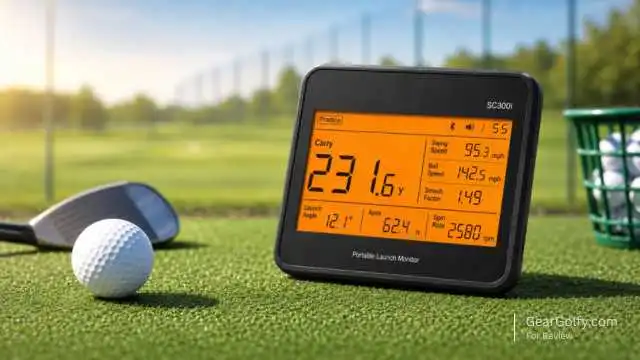
Portable, easy enough to set up, and centered on the numbers most average golfers really care about (distance, ball speed, swing speed, launch angle, smash factor, apex, and spin rate via app).
The SC300i features Doppler radar with calibrated atmospheric pressure sensors, Bluetooth connectivity, voice output, and syncing between the phone or tablet, according to Voice Caddie.
Table of Contents
In this review, we dissect the strengths and weaknesses of the Swing Caddie SC300i launch monitor and see if it deserves a place in your practice bag.
What Is the Swing Caddie SC300i Launch Monitor?
The Swing Caddie SC300i is a radar-based golf launch monitor from Voice Caddie. It is positioned behind the ball and captures important swing and ball-flight data while you practice.
And unlike other compact monitors that prohibit, at best, a smartphone screen to do the back and forth between your phone and stuff, if you use the SC300i, the LCD is cased around hitting the balls without running back to your phone.
This unit is not a little piece of equipment. Official specifications peg it at 6.5 x 4.7 x 1.1 inches and 15.4 ounces, packing a rechargeable lithium-polymer battery good for up to 20 hours in some conditions. It’s light enough for tidy transport to the range but substantial enough that it doesn’t feel like a toy you’d use once every couple of years.
Key Features of the Swing Caddie SC300i
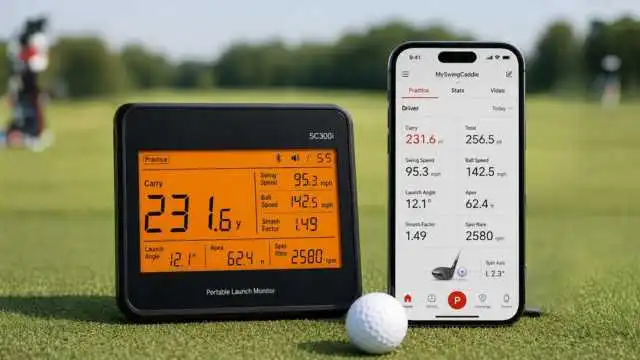
For a launch monitor, these core numbers golfers use when practicing are the most sought after, and that’s why the Swing Caddie SC300i launch monitor is so popular.
Main Data Points
It gives distance information, smash factor, swing speed, ball speed, launch angle, and apex tracked along with spin rate via the MySwingCaddie app. Voice Caddie refers to these as six key on-device parameters—spin rate is available in the app.
Built-In Display and Voice Output
One of the sometimes underappreciated aspects is the big display. Unlike some other apps, you do not have to unlock your phone straight after every shot just to see carry distance. It’s important to note that the device also talks you through these distances, which would be handy when practicing solo or throwing several buckets in quick succession.
Golf Monthly said that you can clearly see what the SC300i is telling you, which, combined with an audio callout and app video integration, makes it worthy of its place among the best portable launch monitors for under $600—even up to October 2023.
App Connectivity
A session history shown on the MySwingCaddie app transmits real-time shot data, video of each swing, and also more precise tracking. The app seems to add more long-term value for a Swing Caddie launch monitor over a basic speed-only device if you’re trying to map distances through the bag or track week-to-week progress.
Swing Caddie SC300i Accuracy and Performance
The accuracy is what you are buying a launch monitor for in the first place. The SC300i means no TrackMan, GCQuad, or Foresight for you, but given its price class, it is super handy.
However, Voice Caddie claims that accuracy for its SC300i is ±2% ball speed, ±3 yards carry distance in a target mode, and ±3% carry distance in practice mode. Its measuring range is listed as being between 10 and 370 yards.
That is one of the reasons you are especially tough at distance gapping if you are a Swing Caddy SC300i launch monitor. You use an 8-iron to hit the ball an average of 145 yards; you hit it with a 7-iron for an average distance of 158—then you have more information with which to organize how you play. It is also beneficial for determining if a driver change is actually generating more ball speed or just feeling faster.
This works similarly to most radar monitors; it needs to be aligned properly and set. Voice Caddie suggests placing the unit no less than five feet behind the ball on a parallel level plane with that ball.
Readings can be influenced by hitting range balls, suboptimal lighting conditions, rough carpet rolls on the floor during indoor ball flight, and, worse, a bad hitting setup.
Ease of Use
Particularly, this remains one of the prime qualities of any SC300i. You turn it on, put it behind the ball, select the club, and get to hitting. It’s a great touch to include the remote so that you do not have to bend down at each set for changing clubs.
The Swing Caddie SC300i launch monitor comes to the rescue for golfers who dislike complicated tech, and it stacks up better than many app-first devices! Use all basic features without your phone, and make a connection to the app whenever you want free analysis.
The battery life also helps. Golf Monthly guide to 8 affordable 2026 budget launch monitors Golf Monthly’s guide to the SC300i features over 20 hours of battery life, which is longer than many portable competitors in our roundup.
Swing Caddie SC300i for Practice and Game Improvement
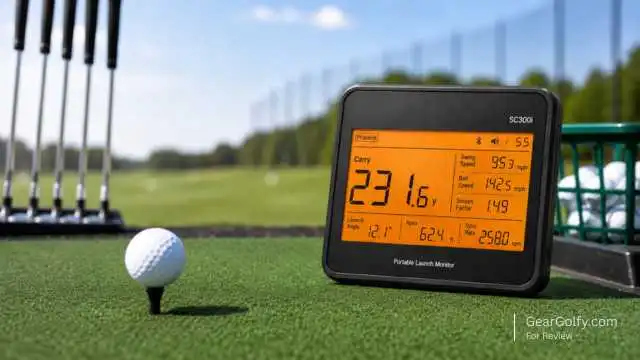
The SC300i is best applied with an agenda. Hitting balls randomly and only looking at the numbers is fun, but this is where structured practice pays off.
For wedge work, incorporate this in constructing a carry-distance chart for half, three-quarter, and full swings. Stick with your average carry, not your best shot for irons. For golfers, monitor ball velocity, launch angle, peak (or apex), and smash factor to find whether you are actually enhancing strike quality or merely swinging harder off the tee.
At lessons, the Swing Caddie SC300i launch monitor is good to have too. It can be used by a coach to verify if a given swing change produces an improvement in launch, speed, or contact efficiency. It will not diagnose every swing flaw, but it is giving you objective feedback rather than feeling-based judgments.
Can You Use It With a Golf Simulator Setup?
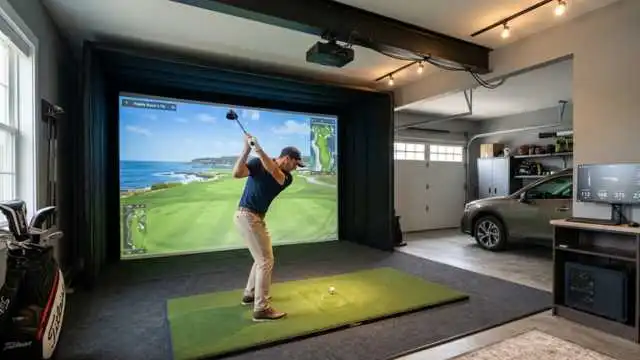
This is where expectations matter. The SC300i can be utilized indoors for practice data, but that’s not the same as a full-blown golf simulator system where you can play virtual courses with projected ball flight.
SC300i can help you achieve that if your target was a simple indoor practice with numbers. If you want it to be a full simulator where you can do course play, view the shot shape, integrate impact screen and sim software then you’ll want other options.
By way of comparison, Golf Monthly points out that the Garmin Approach R10 pairs with the Garmin Golf App and is designed for virtual-course play; the Voice Caddie SC4 is marketed as a simulator. The SC300i shouldn’t be viewed as an out-and-about golf sim engine but more as a practice center launch monitor.
Pros and Cons of Swing Caddie SC300i Launch Monitor
Pros
Easy to set up, the SC300i includes a readable built-in display that offers voice feedback and delivers golfers the crucial metrics to practice with. Battery life is great on those long-range sessions, and the app provides video and data history. It’s portable enough to lug between home and the range easily.
The Swing Caddie SC300i Launch Monitor offers a solid balance of simplicity and usable data for the price.
Cons
That said, it’s not the smallest launch monitor out there. This also isn’t the ideal option for golfers looking just to have a full indoor golf simulator system. The nature of spin rate is app-based, and similar to most radar units, the quality of results depends incredibly on proper setup/alignment/ball conditions/and ball flight availability.
As with the SC300i, these features miss out on deeper club-delivery metrics that advanced fitters and elite players might desire: face angle, club path, angle of attack, and/or dynamic loft.
Who Should Buy the Swing Caddie SC300i Launch Monitor?
For the mid- to high-handicap golfer looking for improvement with distance control, a serious amateur working on both speed and consistency, or a range regular seeking instant feedback without having to go through the hassle of an extensive setup, buy the Swing Caddie SC300i launch monitor.
It’s also a move that makes sense for golfers who are happy to grab dedicated screen devices instead of just phone-only gear. This is a solid choice IF you practice outdoors frequently, want dependable carry numbers, and do not need full simulator software.
Who Should Avoid It?
If you perform only a handful of practices a year or are not interested in tracking numbers, the SC300i may be overkill for your needs. If anything, a simple range finder and a plateau in lessons may help more.
If you are investing in a high-end indoor golf simulator or sophisticated club data, then you should also look elsewhere. In that instance, the additional expenditure may be well worth it for a monitor more tailored to a simulator.
Buying Guide: What to Consider Before Choosing a Golf Launch Monitor
Determine Your Main Use
Determine if you want golf course shooting feedback, indoor simulator training, or both. SC300i does when it comes to training feedback, but makes a bad centerpiece for an entire sim room setup.
Check the Metrics You Need
Look at the metrics. Most players do not need carry distance, ball speed, swing speed, launch angle, apex, and smash factor. Trained golfers might look for club path, face angle, spin axis, descent angle, and shot-shape graphics.
Consider Ease of Use
consider convenience. A launch monitor you use is better than the next model up that languishes in the closet. Golfers who wanted an easy-to-set-up monitor with simple feedback have always appreciated the Swing Caddie launch monitor family.
Compare Price, Warranty, and Return Policy
Get the price, warranty, and return policy, and verify it. As of writing, Voice Caddie has the SC300i listed for $399.99 with some discounted promotional text, free shipping to 48 contiguous U.S., a 30-day return policy, and a one-year warranty.
Final Verdict
The SC300i Swing Caddie launch monitor is an exceptional option for golfers wanting valuable practice data without all the complicated processes. It’s got key numbers, can work outdoors, has a very practical built-in display, and has decent app support to track progress over time.
The right launch monitor for you isn’t the full golf simulator or tour-level club-delivery data—it is not. However, for things like range sessions, wedge gapping, or just general game improvement work, the SC300i offers a really tantalizing sweet spot.
Buy the Swing Caddie SC300i launch monitor if you’re looking for an affordable, portable, and easy-to-use, data-rich practice tool. The best of the lot when it comes to golfers that are done guessing and ready to place a purposeful practice regimen in play.
FAQs on Swing Caddie SC300i Launch Monitor
Yes, for its category. Accuracy is ±2% for ball speed and ±3 yards (in target mode) on the Voice Caddie. That’s accurate enough for distance gapping and practice feedback for most recreational golfers.
Yes, but spin rate is available in the app and not as an on-device display metric.
It can only be used indoors with the right setup, and it is not a full-blown golf simulator system. Be sure you have room for safe swings and enough ball flight to get a radar reading.
The company recommends at least five feet behind the ball and level with the ball.
Yes, definitely. For beginners, the key things to focus on are carry distance, ball speed, and having consistent results with every shot. Statistics for Accuracy The numbers can serve to make practice more purposeful, but not so excessive that you get overwhelmed.