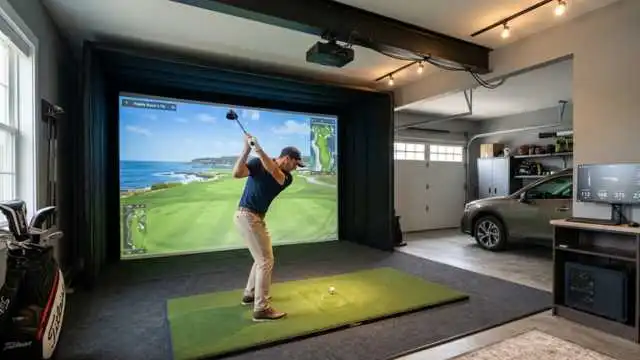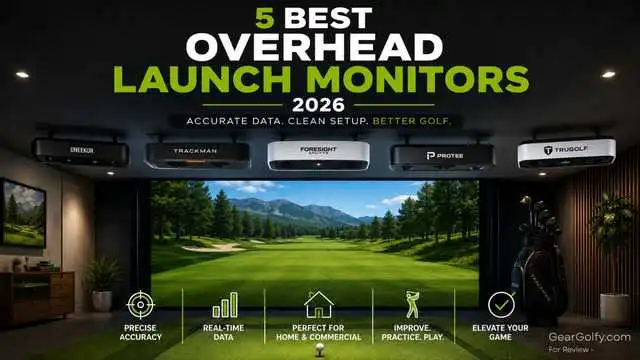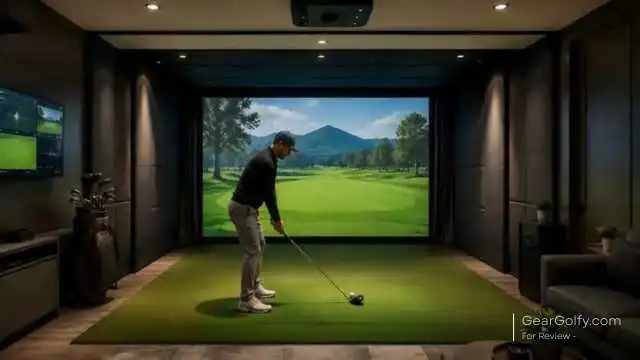
They have quite rapidly become the most popular option for an overhead launch monitor among serious indoor golf simulator users. Unlike the others that sit behind the ball, next to the hitting area, or on the floor, these systems are ceiling-mounted and have a fixed position directly above the golfer.
Although that design solves one of the most common headaches in simulator rooms: consistency with setup. After being installed and calibrated for the first time, that means most overhead golf launch monitors are not moved.
You don’t have to carry the unit around for different clubs, different golfers, and right- and left-handed players. That type of convenience that can be a game-changer for home golf simulator owners, coaches, club fitters, and commercial indoor golf facilities alike.
However, overhead systems are not for everyone. Typically more expensive than portable launch monitors, needing a dedicated hitting area in your home and sometimes require professional installation.
Table of Contents
This guide describes how overhead launch monitors work, how they differ from portable and other radar-based systems, and what you need to know before buying.
What Are Overhead Launch Monitors?
They are sometimes called overhead launch monitors, and these devices are positioned on a ceiling or a ceiling bracket above the hitting area.
They measure ball data, club data, or both; then relay that information to golf simulator software so you can see shot shape, carry distance, spin, launch angle, club path, face angle, and other performance metrics.
The majority of overhead units are geared toward indoor golf. They are commonly used in:
- Home golf simulator rooms
- Garage golf simulator setups
- Teaching studios
- Club fitting bays
- Indoor golf businesses
- Commercial simulator lounges
The best part is that the unit just gets out of your way. Being that it is on top of the hitting zone, players can swing freely without interfering with the monitor or needing to then move it for every shot.
According to the PGA, launch monitors use either high-speed cameras or radar to gather data on ball flight, distance, spin rate, and clubface position at impact. This makes them suitable for practice and equipment fitting too.
How Overhead Golf Launch Monitors Work
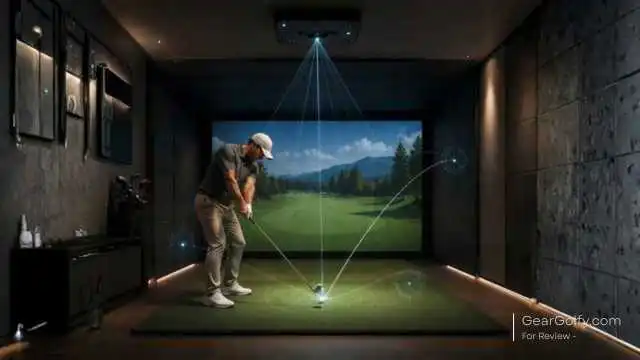
Camera-Based Tracking
One overhead launch monitor type is called a photometric system. They mean they are shooting the ball and club at or immediately after impact with high-speed cameras. The system captures images of the ball, clubface, and launch conditions calculates shot.
Camera-based tracking is particularly beneficial indoors since the ball only makes a short journey before reaching the impact screen. Your camera system does not need to observe the ball fly more than 150 or 250 yards. It pitches what is during the most crucial and sensitive window and initial launch behaviour!
The general difference: according to golf.com, Doppler radar systems measure the movement of an object throughout space as it moves; high-speed camera systems quantify impact more detail and track ball flight beginning with the initial movement of both the ball and club. Camera systems do excel in more confined spaces, such as indoors.
Radar, Infrared, and Hybrid Systems
Not all ceiling-mounted launch monitors are entirely camera-based. Some systems combine multiple technologies. Trackman iO, which measures what Trackman says are 3D spin and spin axis in real time using radar, infrared, and a high-speed imaging system.
This is important because the term “overhead launch monitor” classifies the mounting position, but not a single tracking technology. Comparing products, look at both:
- Mounting type: Top, Wall-Mounted, Portable Side or Behind the ball.
- Tracking technology (photometric cameras, Doppler radar, infrared, hybrid radar/camera, or another combination of sensors).
Ball Data vs. Club Data
A proper overhead golf launch monitor is capable of measuring or computing the ball flight data required for simulator play. Common ball data includes:
- Ball speed
- Launch angle
- Launch direction
- Spin rate
- Spin axis
- Carry distance
- Apex height
- Landing angle
- Total distance estimate
Coaching, fitting, and swing analysis: Club data is also just as important. Common club metrics include:
- Club speed
- Club path
- Face angle
- Angle of attack
- Dynamic loft
- Smash factor
- Impact location
Default club data differs per model. Certain systems need reflective stickers on clubs, ball markings, software tiers, or add-ons. For example, Uneekor mentions 24 data points on its EYE XO2 page and indicates that club tracking is performed with reflective stickers.
The Falcon product page on the Foresight website details the ball data (ball speed, launch angles, spin, and spin axis), carry distance, plus club data (club head speed and some others)
Make sure to always confirm these data points, software access, and more with the manufacturer before purchasing as of October 2023.
Why Overhead Launch Monitors Are Popular for Indoor Golf
Most notably, units design that ensures the maximum benefit is achieved by leaving them as removed from the eye line as possible. Every inch counts in a simulator room.
This means it needs a big enough depth for a full swing, how far out from the hitting mat to put an impact screen, side netting, or a broken window-free enclosure on both sides of you, where you can put your projector around, in addition to how much space there is available all-around you as the player safely swings away.
A clean hitting area is maintained by a ceiling-mounted launch monitor. The golfer is not being filmed from a tripod. There is no side unit to kick, bump, or accidentally block the way. For facilities, that means fewer staff changes between sessions.
Overhead launch monitors are especially attractive when:
- The same bay is used by a host of different golfers.
- Need to play with both hands (right and left) without moving equipment.
- The simulator room is permanent.
- The owner wants it to look clean and professional.
- Keep it out of the foot traffic way, from other people using the launch monitor.
- You use the bay for lessons, fittings, leagues, or commercial play
According to Foresight, the GCHawk captures shots from driver through putter with enough range that the very large ball-capture area enables both right-handed and left-handed players to hit balls.
This style of design is one of the many reasons overhead systems exist in high-end simulation environments.
Overhead Launch Monitors vs Portable Launch Monitors

Understanding how overhead units differ from portable ones will help you find the best overhead launch monitor for your space before deciding on one.
Portable launch monitors are generally located behind the ball, to the side of the ball, or close to the hitting area. They are easier to hide and usually less expensive. They are used by lots of golfers at the local range, on-course, or in makeshift indoor setups.
Overhead launch monitors are different. These are made for either permanent or semi-permanent simulator rooms.
Portable Launch Monitors Are Better For:
- Golfers who practice indoors as well as outdoors
- Players with limited space
- Renters who cannot mount equipment
- Budget-conscious buyers
- Golfers who want easy storage
- Range practice and travel
Overhead Launch Monitors Are Better For:
- Dedicated indoor golf rooms
- Multi-player simulator setups
- Teaching studios
- Club fitting businesses
- Left- and right-handed player rotation
- Commercial simulator bays
- Golfers looking for a clear-cut, professional configuration
If you seek flexibility, a portable unit may be the wiser purchase. If your simulator space is permanent and you prefer a unit that can be set up easily, accurately & repeatably, then an Overhead Launch Monitors unit will probably be the better option.
Pros and Cons of Overhead Launch Monitors
Pros
- Great for permanent indoor setups -Moreover, after securing and calibrating, the monitor stays fixed in location.
- No floor clutter -You do not need a unit behind or next to the ball.
- This is simpler for golfers who use right and left hands -Most overhead launch monitors accommodate both players simply by shifting the monitor.
- Professional look -Ceiling-mounted launch monitor leaves your simulator room free of clutter.
- Lower risk of being hit -Since the unit is located above the player, it is less exposed to outside intrusion than floor-based devices.
- Powerful workflow for coaches & fitters -If overhead launch monitors have to be adjusted constantly, then lessons and fittings will flow faster when it is not always getting readjusted.
Cons
- Higher upfront cost -Typically, overhead systems are premium-type.
- Installation matters -Mounting height, alignment, hitting zone placement, and calibration should all be correct.
- Not portable -People who know many of these systems are not range cookies.
- Ceiling height is important -Having a low ceiling hampers many types of installations safely.
- Software costs may apply -Certain systems necessitate subscriptions, software licenses, course packages, or paid upgrades.
Best Use Cases for Golf Overhead Launch Monitors
Indoor Golf Simulators
Overhead launch monitors are one of the best matches for indoor golf simulators because they sits over head and do not need to be manually repositioned after each shot. This certainly makes simulator sessions a lot smoother and more enjoyable.
They’re perfect for players who wish to play rounds virtually, practice through the winter, and get real-time feedback while never leaving the house.
Home Setups
In the United States, Overhead Launch Monitor systems can be found at home garages, basements, bonus rooms, and even dedicated simulator rooms. They make sense if you:
- Practice several times per week
- Want a clean setup
- Have enough ceiling height
- Share the simulator with family or friends
- Prefer a permanent installation
Commercial Studios
Durability, Speed, and Ease of Use Simulator businesses need out there. The overhead systems come to the rescue because the players can spin, and equipment does not need to be moved. They are useful for:
- Indoor golf lounges.
- Membership-based simulator clubs.
- Winter golf businesses.
- Entertainment venues.
- Corporate event spaces.
Coaching Facilities
Key benefits for golf instructors: Reliable data and fast workflow; golf overhead launch monitors free a coach to focus on the student rather than hardware adjustment; The most valuable coaching data tends to be:
- Club path
- Face angle
- Attack angle
- Launch direction
- Spin axis
- Carry distance
- Strike quality
Club Fitting Bays
Club fitters need reliable numbers. You can compare shafts, heads, lofts, lies, and ball models in a controlled indoor environment using overhead systems.
When fitting, look for systems that deliver quality ball data and invite trustworthy club delivery data.
Product Examples to Research Overhead Launch Monitors
Here is a list of some of the golf overhead launch monitors or ceiling-mounted indoor systems you should consider studying. This is not a definitive list; it can change, and product specs are mutable.
Overhead Launch Monitors Buyers are requested to confirm the latest specifications, data points, pricing structure details/terms, and warranty terms/scope of coverage/subscriptions/installation requirements from the manufacturer directly.
Uneekor EYE XO and EYE XO2
Uneekor– EYE XO (front-mounted overhead dual high-speed cameras, ball and club data, adjustable hitting zone, visualising your swings + AI-powered feedback). The EYE XO2 features three additional high-speed cameras, and Uneekor touts it with its largest hitting zone integrated within 24 data points.
These systems are often top considerations for serious home simulator owners and coaches who want camera-based indoor tracking but unobtrusive overhead installation.
Foresight Sports GCHawk and Falcon
Foresight has since launched the GCHawk, which is an award-winning overhead launch monitor with a wide ball-capture range and compatible with both right- and left-handed golfers.
The Falcon – a fresh overhead-mounted Foresight offering featuring in-line design, photometric technology and labelled ball and club data points.
These warrant investigating if looking for premium indoor simulator rooms, coaching studios and commercial bays.
Trackman iO
Trackman iO is a ceiling-mounted launch monitor that is also designed for indoor use with features of radar, infrared and high-speed imaging.
Trackman places it for home and commercial sim setups, and different data parameter levels are listed, depending on the package.
Trackman Simulator: If you like Trackman software, data ecosystem, and want a premium indoor sim experience, it is probably worth considering.
Buying Checklist for Overhead Launch Monitors
Use this checklist to help you decide the best overhead launch monitors for your simulator room.
1. Measure the Room First
Do NOT begin with the launch monitor. Start with the room. Measure:
- Ceiling height from hitting surface
- Room width
- Room depth
- Tee-to-screen distance
- Tallest Golfer Swing Clearance
- Projector location
- Ceiling joists or mounting points
2. Decide Which Data Actually Matters
A more casual simulator player will probably care most about carry distance, shot shape, and course play.
Club path, face angle, attack angle, dynamic loft, spin axis impacted location are what coaches or fitters might need.
Problems arise if you buy too much data that you will never use, but also don’t underbuy data if the plan is to teach, fit clubs, or even diagnose mechanics in the swing.
3. Check Left/Right-Handed Compatibility
Hitting zone size is very important if you are going to be using the simulator for right-handed and left-handed golfers. There are what they call timed stencils in the game that only last a certain amount of time.
Other portable units need to be shifted when players change sides. This is the solution for many overhead systems, but certainly not all hitting zones are equally sized.
4. Confirm Software Costs
Simulator output can modify the real total cost of ownership (TCO). Check whether the package includes:
- Driving range software
- Course play
- Skills challenges
- Online play
- Club data access
- Commercial license rights
- Annual subscription fees
- Software upgrade paths
5. Plan for Installation
This is because golf overhead launch monitors are not plug-and-play like portable units.
This type of entry can be installed by some skilled DIY owners, but most purchasers would do well to have them professionally installed. Budget for:
- Ceiling mount or drop mount
- Electrical outlet
- Ethernet or USB routing
- Calibration
- Projector alignment
- Enclosure setup
- Computer configuration
6. Verify Support and Warranty
Since any overhead is part of a simulator system, support can be an issue. Find out who you contact for the installation queries, software issues, hardware service, and warranty service.
Conclusion
Playing a dedicated indoor golf simulator- overhead launch monitors is one of the best solutions. For example, they keep the hitting area clean, you have less setup fuss, they’re supporting a greater quality professional simulator room, and it can even make playing with right-handed targeting from method to process.
They are not ideal for every golfer, however. A portable launch monitor might be the smarter buy if you want portability, a relatively outdoor-friendly range, or just something that takes less of a commitment.
If you are building a dedicated golf simulator space for practice, coaching, fittings, family use, or for commercial play, an overhead golf launch monitor should be at the very top of your short list.
The important bit is to base a choice on your room first. Measure simulator space, check ceiling height, decide on ball and club data needs, confirm any software costs, and read the latest manufacturer installation guidelines.
The top overhead launch monitors are incredibly powerful tools, but they only operate at their best when you set up the chamber, mount, calibration, and software all correctly.
FAQs
These are more suited for proper indoor golf simulator rooms – particularly when you want a tidy setup, fixed calibration and effortless right/left-handed play. If you want to use the device outdoors (to practice), travel with it, or just avoid permanent installation, then a portable launch monitor is superior.
The main advantage is convenience. The unit remains positioned over the hitting area, keeps the area underneath free prior to and after shots, and typically gets rotated less frequently between players. This is of great use in home simulator rooms, coaching studios, and commercial facilities.
Most are made to handle at least one of the two, but you have to hit zone size and install for a good experience. Before purchasing, ALWAYS refer to information from the manufacturer regarding the hitting zone as well as left/right-handed players.
Most overhead launch monitors are camera-based or photometric, though not all. A few systems suspended from the ceiling use a hybrid of radar, infrared, and high-speed imaging technology.
It depends on the model of Overhead Launch Monitors. Some systems require roughly 9 to 10 feet, while others have different mounting ranges. Also remember that the golfer needs enough clearance to swing a driver safely. Always check the installation manual for the exact unit.