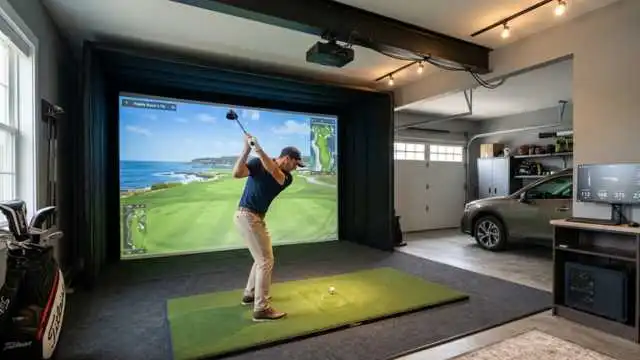
The Shot Scope LM1 launch monitor is one of the most interesting new bits of budget golf tech right now if you want useful golf data without dropping the price of a new driver fitting setup.
Small, stupid-simple, with a specific target audience — golfers who want to know how far they truly hit the ball. Including new golfers, weekend warriors, range rats, and golf enthusiasts looking to up their game without the recurring monthly bill.
The big question: is it simply another very inexpensive speed radar, or is it an actually effective practice tool that can lead to smart golf?
In this review, I will discuss why it works, where it can fall short, who should buy it, and how it stacks up against other sub-$500 launch monitor devices on the market.
Table of Contents
What Is the Shot Scope LM1 Launch Monitor?
Shot Scope LM1 launch monitor — Compact Launch Monitor for Golf Practice. Built to deliver essential shot data for golfers during range, indoor practice, on-course practice, and speed training.
It does not operate like a complete simulator system. It is not designed to be a replacement for Trackman, Foresight, or other professional fitting tools.
The LM1 launch monitor, on the other hand, targets what most recreational golfers actually look at. These are easy numbers but valuable data:
- Club speed
- Ball speed
- Smash factor
- Carry distance
- Total distance
For many golfers, that is plenty. No digging through confusing data to understand your actual carry distances, compare clubs, analyze strike quality, and record swing speed.
The price is the most appealing factor. The Shot Scope launch monitor is in the budget category, but it adds a nice display, phone app syncing, and no subscription is needed.
Key Features of the Shot Scope LM1
Shot Scope LM1: A no-nonsense setup. It doesn’t bombard you with tour numbers. Let us highlight the most prominent features:
- Built-in color display
- Practice Range mode
- Speed Training mode
- On-Course mode
- Indoor and outdoor use
- Shot Scope app syncing
- Rechargeable battery
- Compact case-friendly design
- No required subscription
As a practice tool for a golfer who mainly wants to hit range balls, it does deliver the essentials.
If you tend to use speed sticks or are just curious to see whether your driver speed is getting faster, the Speed Training mode can come in particularly handy. It allows you to take a swing without hitting a ball, but still receive club speed feedback.
Having integration for the app is also an advantage compared to some older generations of budget monitors. You are looking at all the data and carrying it forward. You are then able to see sessions and, over time, patterns.
Design and Portability
This is something that many golfers will consider because of the portability. Short enough to be kept in a golf bag.
It doesn’t require a tripod, tablet, or projector, or special space to hit into. You put it behind the ball, select your club, and go. That makes it practical for:
- Driving range practice
- Garage net sessions
- Backyard hitting nets
- Warm-ups before a round
- Speed training at home
- Travel practice
The fact that it has an integrated screen is also a major advantage. Depending on which portable launch monitor you go with, it may require your phone for just about everything.
The unit of the LM1 (and gear like it) is able to post numbers directly on the unit, which is invaluable on a hot day when your phone screen can be impossible to read or simply gives up as battery life approaches nil.
The whole thing just seems designed for golfers looking to get on this fast and not to play with a complicated piece of tech.
Setup and Ease of Use
Setup: Setup is one of the best features of the LM1 launch monitor. You switch it on, set your mode, select the club, put the unit behind the ball, and swing.
That process should feel simple after the very first session for most golfers. Calibration process all in one piece. No stickers to apply to the club or ball. Special golf balls are not necessary.
Position it behind the ball, on your target line, for best results! It should be level and have an unobstructed view of the club and ball.
The one drawback is club choice. If you need to have some accurate session data in the app, you’d better remember to change clubs on the device.
I suppose that’s easy when you’re on a full set of 7-irons, but it can be annoying if you’re walking club to club. Nevertheless, this is still a very easy option compared to a lot of launch monitor setups.
Accuracy and Performance
Accuracy is the primary reason we are seeing so much buzz around the LM1 launch monitor relative to its price point.
Kneaded is not simply a professional fitting machine; you should regard it as an individual training tool in genuine practice, and certainly get to know your competitors. That is the right expectation.
Ball speed, club speed, carry distance, and smash factor trends will probably be the most important numbers to you. These allow you to respond to basic questions:
- Am I swinging faster?
- Am I hitting the ball better?
- What is the maximum difference between the carry with each club?
- Are you going further with this club than it will replace?
- Are my range distances consistent?
This is where the LM1 functions. As with most budget devices, it’s probably a touch imperfect on very curved shots, awful mishits, or deliveries struck in a limited indoor environment.
Driver numbers can also diverge more than short irons due to distance being much more influenced by launch, spin, and strike quality.
The LM1 launch monitor should be a one-stop shop for gapping wedges and irons. For the driver, it is more about the trends than treating all carry numbers as perfect.
It would be most appropriate to average this data over multiple shots. Player: Judging your game on 1 swing
What Data Does the Shot Scope LM1 Track?
Five Main Data Points Tracked by the LM1 Launch Monitor:
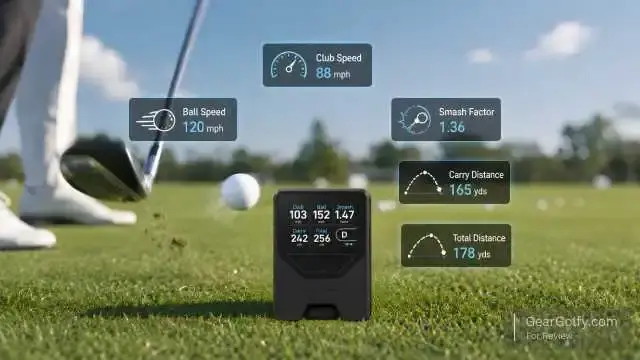
1. Club Speed
Club speed: How fast is the clubhead moving at impact? This is good for speed training as well as driver distance work.
2. Ball Speed
Simply put, ball speed is how fast the golf ball speeds off the clubface after impact. It teaches you how to understand the quality of a strike and actually transmit energy.
3. Smash Factor
Smash factor is ball speed divided by club speed. The bigger the number, the more often you are effectively passing your energy.
4. Carry Distance
Carry distance is the total distance the ball flies in the air before it lands out. That number above is the one everybody uses for club gapping and course strategy.
5. Total Distance
They are trained to carry plus rollout total distance estimates. It can help, but rollout can change a lot on the ground. The carry number we usually can trust more for scoring. But just as important is what the LM1 doesn’t show.
It does not show spin, launch angle, descent angle, face angle, club path, or dispersion. That’s when golfers wanting those numbers will need to reach for the more sophisticated launch monitor.
App Experience and Data Tracking
Shot Scope’s app elevates the device beyond a standard one-shot radar. It will also automatically sync your numbers by club after a practice session. This provides insight into averages, highs, and lows, and shot-by-shot performance.
This is helpful for the average golfer because practice starts to become less random. Instead of the general, “I think my 7-iron goes about 150,” you can establish an actual distance profile over several sessions.
This is quite useful for weekend warriors struggling with club selection. You stop taking the club based on ( your best-ever shot ), and knowing your true carry number will save you strokes!
The app experience is not attempting to be an entirely simulated dashboard. Rather, it is about keeping a record of your practice.
LM1 Launch Monitor Pros and Cons
Pros
- Good price point for a golf launch monitor
- Small and easy to carry
- Simple setup for beginners
- An integrated display doesn’t need a phone to work
- Follows all Major base Statistics
- Good for distance gapping
- Useful Speed Training mode
- Works indoors and outdoors
- Syncs with the Shot Scope app
- No required subscription
Cons
- Does not show spin rate or launch angle
- Not a golf simulator
- Less than satisfactory for actual club fitting
- The only two manual selections available are club adjustments
- On offbeat strikes, driver carry numbers might be more variable
- In your indoor space, indoor performance will largely depend on the space and setup
- More data if you are more advanced
Who Should Buy the LM1 Launch Monitor?
The LM1 launch monitor is the right kiwi for golfers who want data without cluttering up practice. It is best for:
- Beginners who want to understand what a real distance is.
- Heading to the range for a few shots now and then
- Budget-conscious players
- You are targeted at golfers who desire a portable launch monitor
- Players who are doing speed training
- Golfers hitting into a net and wanting feedback
- Anyone who hates subscription fees
- Full discount on practice mode if you are a Shot Scope user
If your number one focus is to see ball flight data and practice with a specific goal in mind, the LM1 launch monitor makes a lot of sense.
And it makes sense for golfers sick of the guesswork. The average amateur picks clubs by their ego, memory, or one great shot they hit last summer. A launch monitor can help get those figures back to earth.
Who Should Avoid It?
Not everyone is ready for the LM1 launch monitor. If you want, would it be better to drop:
- Full simulator golf
- Shot shape graphics
- Spin rate
- Launch angle
- Club path
- Face angle
- Dispersion maps
- Premium indoor simulator accuracy
- Professional fitting-level data
If you are a low-handicap gear tester, club fitter, teaching professional, or serious simulator player, then you’re likely going to want something with more power.
And secondly, if you practice primarily indoors in a short area, be aware. Inexpensive radar devices typically require several ball flights to provide accurate estimates.
The LM1 only really shines when you approach it as a useful practice tool, and not an actual full-fledged lab analyzer.
Shot Scope LM1 vs Other Portable Launch Monitors
Sure, the PRGR, Voice Caddie models, Garmin devices, and Rapsodo products are all options for the affordable launch monitor market.
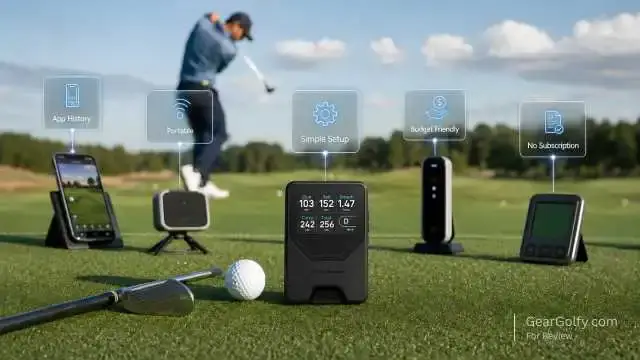
Unlike many competing models, the LM1 keeps things simple while still allowing golfers to track and review their practice sessions through the companion app.
Compared with PRGR
PRGR is widely used for swing speed and basic distance feedback. Very simple but very useful, especially for speed training.
You might find the LM1 a bit more modern in that it has a clearer interface, easy syncing with Shot Scope’s app, and sits in a much stronger golf data ecosystem. If you are looking purely for speed, PRGR may do the job.
The LEA performs well, but the LM1 stands out as the better choice for golfers who value productive practice sessions.
Compared with Voice Caddie
Similarly, Voice Caddie models typically provide basic range feedback but offer added features depending on cost.
The LM1 launch monitor is compact, simple, and free of subscription fees, so it holds up competitively. Other Voice Caddie units can add distance or remote features, but they are more expensive.
Compared with Rapsodo
For golf nerds who want video, visualizations of shots, and other app-driven feedback, Rapsodo launch monitors have a great story.
The trade? More so, it often relies on your phone. The LM1 is more suited to golfers who want a dedicated device that they can stop and swing with.
Compared with Garmin Approach R10
The Garmin actually has more simulator-style features and more data points. This is a stronger option for golfers seeking virtual golf and deeper numbers.
On a bar above: The LM1 launch monitor is designed for players looking for a budget-friendly, easier-to-use practice tool that requires minimal setup.
Long story short, the LM1 is far from the best. Where it shines is value, simplification, portability, and enhancing normal practice.
How to Get the Most From the LM1 Launch Monitor
Practice plan using the LM1 launch monitor to improve results. Focus on one club at a time. Make 8 to 12 swings, forget about your really bad swings, and only remember the average. Then repeat with other clubs.
When analyzing your results, treat carry distance as the most important measurement. We know total distance is good, but carry gets you past bunkers, water, and front pins.
Track ball speed and club speed trends for driver practice. So if you see that one of your carry numbers is a little too long or short, do not panic! Look for patterns.
Use it for wedge practice where you develop distances to swing partial swings. Experiment with half, three-quarter, and full power swings. That will help you to improve your scoring from 40 to 100 yards.
Final Verdict
If your key priority is cost-effective, uncomplicated golf data, you may want to check out the LM1 launch monitor.
It is not perfect. It doesn’t provide elite club or ball flight data, and it is not intended for simulator golf. For golfers focused on shot shaping and accuracy, investing in a device that provides spin, launch angle, and dispersion data is well worth the extra cost.
However, for beginners or weekend warriors, and especially those on a budget, the LM1 launch monitor is All The Right Feedback. It teaches you your distances, checks your strike quality, tracks speed, and gives you a little more purpose to practice.
You basically died and lived 30 to 40 years in the future! If more high-tech fitting process data or a complete indoor simulator is necessary, skip it.
The Shot Scope LM1 is one of the most practical golf tech purchases for amateur players at its price.
FAQs
Yes. In addition, experienced golfers and those who need a simpler model early in their playing career would benefit from the LM1 launch monitor, as it helps to keep data straightforward. No need to understand those advanced launch monitor numbers; you get distance, speed, and strike feedback.
It can work indoors — but setup is key. It should have enough distance for the device to sense them both clearly. Outdoor range usage is typically the easiest environment.
No. The biggest selling point is that to use the Shot Scope launch monitor and access the app, a subscription is not required.
Specifics include club speed, ball speed, smash factor, carry distance, and total distance.
Yes. LM1 is equipped with Speed Training mode, allowing you to track club speed even when you’re using a speed trainer or releasing swings without hitting a ball.
No. The LM1 is not a simulator.You aren’t getting virtual courses, shot graphics, or full ball flight visuals.