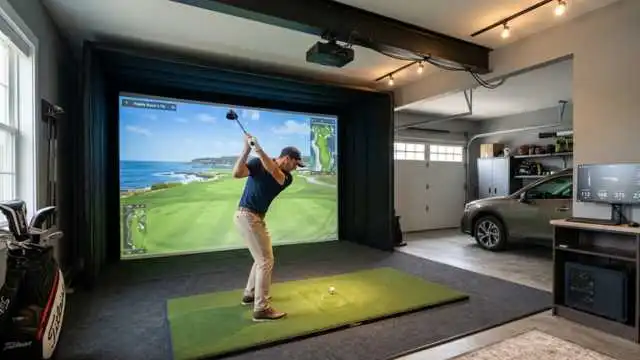
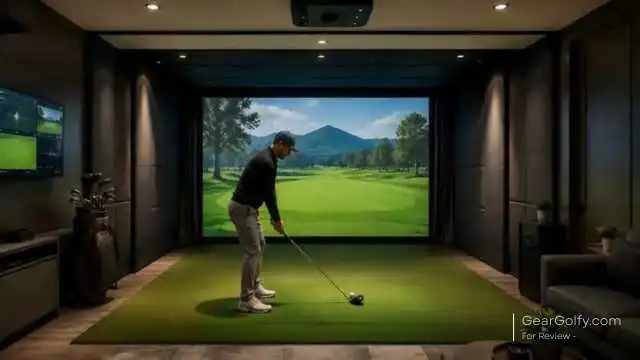
The Foresight GC3 launch monitor sits squarely in that middle ground between consumer-affordable golf technology and true performance equipment. This is not a cheap device you throw in your range bag for casual sessions.
It is a high-quality launch monitor designed for golfers looking to get accurate ball and club information at home, indoors or out, or in a simulator environment.
For many American golfers, the main question is: Is the GC3 worth your money?
The short answer is an emphatic yes for the right player. A longer answer requires how you practice, what sort of data you’re really using it to play golf, and whether you want a launch monitor that can expand into an entire home golf simulator.
Foresight Sports lists the GC3 as featuring a triscopic high-speed camera system, a 6″ x 5″ x 12″ body, a weight of five pounds, and various connectivity options, including USB-C / Wi-Fi / Ethernet, as well as a transflective LCD touchscreen.
Table of Contents
What Is the Foresight GC3 Launch Monitor?
The Foresight GC3 launch Monitor is an overhead camera-based golf launch monitor that gathers ball and club performance data across a 20×90-yard area.
Unlike those radar units that tend to hide behind the golfer, the GC3 plays alongside the hitting area and uses cameras to capture this impact zone.
This allows it to be particularly helpful indoors, where space may not allow for startups. You know that you do not need a long enough ball flight window behind or in front of the ball to get useful data.
The Foresight Sports GC3 launch monitor is fitted with three high-definition cameras and delivers both ball data and club data. The Foresight also mentions multiple connections and a text-based display that can be read indoors and in sunlight.
This, in common language, for me, is an excellent practice instrument. Features: Built for golfers who desire more than just carry and ball speed. This allows you to figure out why the ball flew where it did.
Key Features of the Foresight GC3 Launch Monitor
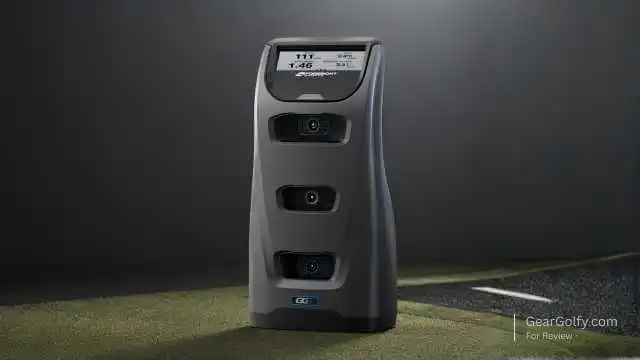
The Foresight GC3 is a reasonably priced Launch Monitor that ticks lots of boxes for performance, portability, and compatibility with simulators. While this is not as feature-packed as the GCQuad, it delivers most of what serious players need.
Camera-Based Shot Measurement
The GC3 utilises a triscopic high-speed documentation system. It’s one of the reasons why so many golfers enjoy using it indoors in simulator studios and garage setups, thanks to this photometric method.
Systems that have a camera-based look tend to perform well in the event of an impact because it shows everything that happens around the area. That’s a significant advantage over radar-based systems, which may require greater space in which to pursue the ball — something that can be important for home users.
Ball and Club Data
Foresight GC3 golf launch monitor: the essential ball data (launch angle, side angle, ball speed, total spin, carry & spin axis). It also gives club data like club head speed, smash factor, club path, and angle of attack.
An example of this is our own Foresight GC3 vs. GCQuad comparison that highlights the even more advanced club measurements (loft/lie, face angle, impact location, and closure rate) available with the GCQuad.
The Foresight GC3 launch monitor’s data set is currently more than enough to develop smart practice sessions for the majority of golfers. So, you can use it to answer questions such as:
- Am I losing distance with bad launch conditions?
- Is my path causing my miss?
- The first question you need to ask yourself is whether or not your wedges are carrying consistent yardages.
- Is my driver spin too high?
- You are fed data through to October 2023.
Portable Design
The GC3 weighs in around 5 pounds, so it can be taken from a garage simulator to a putting green, teaching bay, or golf studio. It may not fit in your pocket, but it still offers excellent portability and delivers high-end performance data without the high cost of a permanent overhead setup.
That portability is a big deal if you routinely split your practice between home and the range. You can work on carrying numbers indoors, then take the same unit outside and test against real conditions.
Touchscreen Display
Having a built-in touchscreen is interesting because it lets you see crucial numbers without constantly referring to your laptop or projector screen. That is great during quick range sessions or any time you want to keep practice simple.
This is something that a good number of golfers overlook. If you are doing wedge distances or dialling in driver settings, being able to just take a glance at a unit will keep the whole process flowing.
Simulator CompatibilityThe The
Foresight GC3 launch monitor is capable of functioning as the engine of a home golf simulator. Foresight Callaway also promotes the GC3 as a range and studio/simulator product, while its FSX software ecosystem covers simulation, practice and performance analysis.
But for a home setup, you would still need the rest of the simulator parts: hitting mat, impact screen (or net), projector or display, pc, enclosure and sufficient safe swing space.
How the GC3 Performs for Home Golf Simulators
The Foresight GC3 launch monitor makes great sense for home simulator buyers. The side-mounted camera layout is good for indoor areas where the radar setup distance may be a challenge.
The average garage or basement golf simulator simply doesn’t have 16 to 20 feet of optimal space depth. The GC3 reads both the ball and club close to impact, making it more forgiving for tighter indoor setups.
That feeling is most potent if you only want to practice for real with a few dozen simulated rounds here and there. You can literally practice bag mapping, wedge control, driver optimisation, and shot shaping at home!
Nonetheless, the GC3 is not the most affordable option for building a simulator. If the primary focus is on entertainment, budget-conscious players might want to stick with a cheaper monitor. The Foresight GC3 launch monitor caters to golfers who prioritise data quality as much as virtual golf.
Using the GC3 at the Driving Range
The GC3, whether you use it indoors or outdoors (and you can use the GC3 outdoors, too). Range practice becomes less random since it provides immediate feedback in carry, spin, launch and delivery at the club face.
You can construct a plan instead of hitting balls and guessing all the time. For instance, you might play with 10 shots with a 7-iron and measure metrics like carry distance, ball speed, launch and spin. This allows you to see your best strikes against your average misses.
This is where a top-of-the-range launch monitor can change your practice habits for the better. It provides feedback after every swing, but still leaves the feel work in your hands. That balance is important.
A side note: with the GC3 placed close to the hitting area, you need to take care in how you put it down and protect it when using it in busy practice environments. Still, it’s not exactly cheap equipment, even though it is portable.
GC3 for Coaching and Club Fitting
The Foresight GC3 launch monitor is a highly useful tool for coaches and fitters. The data is more granular, so it can explain cause and effect without inundating every student.
The club path and angle of attack numbers are particularly beneficial for coaching. So a slicer might actually start to see how they combine path, face control, launch direction, and spin axis.
You are fed data through October 2023, from the GC3, to aid in comparing performance differences between heads, shafts and lofts and lie angles for club fitting.
Having carry distance, ball speed, launch, spin, and consistency all visible at the same time makes it a hell of a lot easier to confidently decide what equipment you want.
However, the advanced club and impact data from the GCQuad and other more expensive systems may still be desirable for high-volume fitters or elite teaching studios.
Foresight GC3 vs. GCQuad Launch Monitors
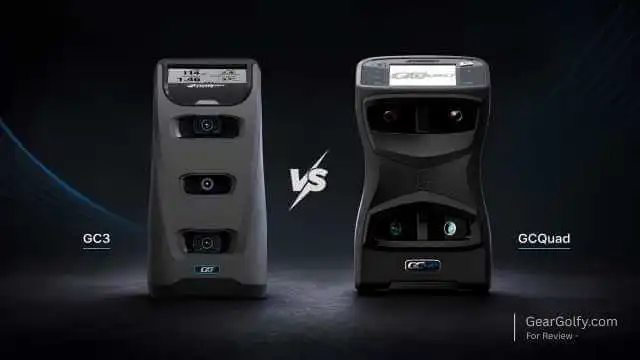
The GCQuad is the advanced model from Foresight’s lineup of launch monitors. With four cameras, it has a more impressive hitting zone and offers more data on the club used.
Foresight lists the GC3 hitting area as 7″ x 10″, and while an impressive footprint, the numbers around the larger GCQuad come in at a whopping 18″ x 14″, with the former using three cameras (two rear, one front) compared to four found on the latter.
Best suited for advanced users are the GCQuad, as it is more ideal for teaching studios and professional fitters or players looking to go deeper with impact data and face data.
For many serious home users, the Foresight GC3 launch monitor makes for a better value play. You literally have a compact, less expensive device that packs in plenty of data.
Pros and Cons
Pros
- Strong indoor and outdoor performance
- Ideal for home golf simulator systems
- Measures data from both balls and clubs
- Able enough for range, studio, and home applications
- Built-in touchscreen is convenient
- Good for coaching, fittings, and practices organised in a structured way
- More affordable than the GCQuad
Cons
- Still expensive for casual golfers
- The hitting zone is smaller than you would find in the GCQuad
- Not every advanced club metric is available
- Information about the full simulator setup at additional expense
- Great for Spin $$$ Launch monitor, but maybe too much for beginners
- Requires being positioned correctly to get the max benefit
Who Should Buy the Foresight GC3 Launch Monitor?
The Foresight GC3 launch monitor is a great solution for serious golfers who practice regularly and want accurate feedback. Which begs the question, when should you keep in mind?
- Desire a high-end golf simulator at home
- Concern capability distance, spin, launch, and club delivery (Only when you build a set of clubs)
- Are you working with a coach?
- Fit clubs or compare gear often
- Want indoor and outdoor flexibility
- Opt for a unit with a camera if there is not enough room indoors.
Your hand is as well with lower-handicap players seeking to tighten up just how they assess the distance and see shot patterns.
That does not imply the need to be scratchy. It’s an ideal experience for mid-handicap golfers who want to take the game seriously — if they care enough to learn what those numbers even mean.
Who May Not Need the GC3?
Not everyone needs an expensive foresight launch monitor for every golfer. If you are only looking for approximate distance estimates, or only play occasionally.
And primarily want just an entertaining simulator to use with family and friends, then the GC3 may not be essential! In which case, a slightly lower cost launch monitor might be a better fit.
For beginners, you might also want to start with lessons before spending money on expensive tech. Data is helpful, but does not replace fundamentals.
With that said, the Foresight GC3 launch monitor shines brightest when you have a reason to measure numbers. Without a plan, even the best data can be high-cost noise.
Buying Guide: What to Consider Before You Purchase
Consider your launch monitor setup and objectives before purchasing the Foresight GC3 launch monitor.
1. Indoor Space
Measure your room carefully. If you have multiple users for the simulator, you want a minimum ceiling height to comfortably swing your club, depth for a safe hitting area, and width for right- or left-handed players. It’s not just the launch monitor in the complete setup.
2. Simulator Budget
The GC3 by itself is more expensive than a set of wheels. If you roll the whole simulator into one price tag, it can get way worse once you add:
- Hitting mat
- Net or impact screen
- Projector or TV
- Enclosure
- Gaming computer
- Software
- Turf and flooring
- Side protection
State the complete budget, not just the price of the monitor.
3. Data Needs
The GC3 might be more club than you need if all you’re looking for is distance. However, it becomes a lot easier to justify if you care about launch, spin, and carry, club path, smash factor, and angle of attack.
4. Coaching or Self-Practice
The Foresight GC3 launch monitor on its own is great, but coupled with an instructor, well, that is better. To convert the numbers into more permanent swing changes, a coach can help.
5. Portability
Ideal for home and range use. If you are looking for one device only to serve both home usage and range practice, then the Foresight Sports GC3 launch monitor offers a practical advantage. Portable without making you feel like a kid
6. Long-Term Value
This is not an impulse purchase like a premium launch monitor. Ask yourself, will you still use it 2–3 years from now? If the answer is in the affirmative, justifying the Foresight GC3 launch monitor becomes an easy task.
Practical Ways to Use the GC3
The smartest way to reap the rewards of the Foresight GC3 launch monitor is purposeful use.
Home Practice
Practice stock distances for all clubs. Chart your carry distance and make it a work-in-progress as you continue to evolve your swing.
Wedge Control
30-, 50-, 70-, and 90-yard wedge shots. Track carry distance and launch. One of the quickest ways to decrease scores.
Driver Optimization
TEST: Tee height, ball position, and driver settings using ball speed, launch angle, spin, and carry data.
Club Gapping
Check if there are any overlaps or gaps in your distance. This is particularly useful between hybrids, long irons, and fairway woods.
Coaching Sessions
You have real numbers to take to your coach. This will make lessons a lot more specific and allow for tracking of progress over time.
Club Fitting
When actual performance data these days outnumbers conclusions drawn from a hunch, compare clubs.
FAQ About the Foresight GC3 Launch Monitor
Yes. The camera-based system reads the ball and club around impact, making it particularly appealing for indoor use. That makes it a good candidate for garages, basements, bedrooms, and dedicated simulator rooms.
Yes. The GC3 is capable of capturing club head speed, smash factor, club path, and angle of attack with other core ball data (ball speed, launch, spin/carry/spin axis).
Yes. Weighing around 5lbs, the GC3 is small enough for home/studio and range use. It’s not as small as some of the entry-level offerings, but it is definitely doable for golfers looking to take pro-level data on the go.
Yes, but it might be overkill for most beginners. The relatively older golfers may be better off with lessons sooner rather than later. Once you are prepared to practice with specific aims, the GC3 starts to add more context.
GC3 does not have the same level of sophistication as the GCQuad. There are four cameras, a bigger hitting zone, and even more club/impact data than the GCQuad. But the GC3 has more than enough to offer for those serious home users, coaches, and golfers who don’t need every tour-level metric available.
Ideal for serious golfers, home sim owners, coaches, club fitters, and players who insist on having accurate data that allows you to work on improvements over time.
Final Verdict: Should You Buy the Foresight GC3 Launch Monitor?
Foresight GC3 Launch Monitor: One of the more interesting premium options for golfers looking to get serious data without going straight to the GCQuad. It’s accurate enough to allow practice that matters, small enough to set up anywhere, and durable enough for your home golf simulator.
However, it’s not the right buy for all golfers. If you play only a couple of times a year or simply want numbers for carrying, you can pay way less. However, if you are creating an indoor golf set-up, whether you work with a coach, dial in equipment, or just try to practice with real structure, then the GC3 needs to be on your short list.
The Foresight GC3 launch monitor is not a shiny golf tech purchase for the right player. It is a long-term training tool that can improve some parts of practice to be smoother, easier to measure, and overall much more useful.