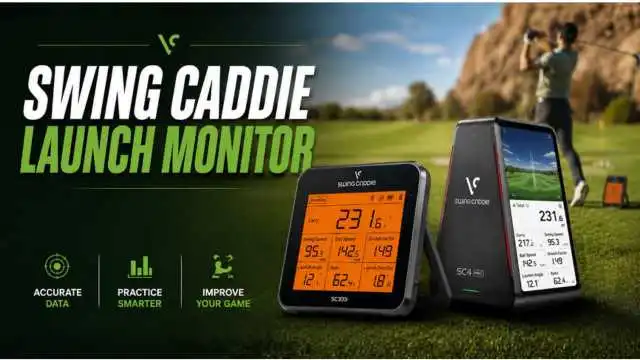
The Swing Caddie launch monitor has become one of the most popular options among golfers hoping to get some useful shot data without paying the price tag of a higher-priced tour-level system.
For most U.S. golfers, it is simple: take it to the driving range, place a ball behind it, hit shots, and immediately see numbers like carry distance, swing speed, ball speed, launch angle, and smash factor.
This is what makes Swing Caddie especially appealing for beginners, mid-handicap players, those looking to practice golf at home, and golfers putting together a budget-friendly simulator.
The brand is not trying to take the place of a professional fitting studio. Instead, it provides an everyday golfer a useful method to figure out his or her swing and see how that swing progresses over time.
One quick note before we get started: Voice Caddie’s current U.S. launch monitor range is led by the SC300i and SC4 PRO, but plenty of golfers are still searching for both pieces of hardware under family names like “SC4” or “Swing Caddie SC4.”
Table of Contents
Throughout this guide, the term “SC4” refers to what is otherwise known as the SC4 simulator-style model family. This document describes properties of the SC4 used in the SC4 PRO where practical/useful. Make sure to check out the current retailer and official product pages before purchasing, as prices, availability, bundled software, and features are subject to change.
What Is a Swing Caddie Launch Monitor?
A Swing Caddie launch monitor is a portable golf launch monitor made by Voice Caddie. The device sits behind the golf ball and uses radar-based tracking to measure key swing and ball-flight data.
Instead of guessing whether you hit a good shot, you can look at numbers such as carry distance, ball speed, swing speed, launch angle, and smash factor.
Voice Caddie positions the Swing Caddie lineup as a practical training tool for golfers who want instant feedback indoors, outdoors, at the range, or in a home practice space.
The SC300i uses Doppler radar and offers core shot data, while the SC4 PRO adds simulator functionality and expanded ball-flight metrics.
In simple terms, a Swing Caddie golf launch monitor helps answer questions like
- What is my real carry distance with each club?
- Am I swinging faster or just swinging harder?
- Is my ball speed improving?
- Am I launching the ball too high or too low?
- Am I striking the ball efficiently?
For recreational golfers, those answers can make practice much more focused.
Why Golfers Use Swing Caddie Golf Launch Monitors
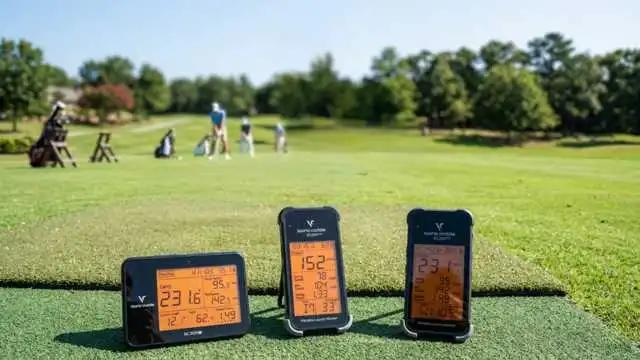
Golfers use Swing Caddie golf launch monitors because they make practice more measurable. Without a launch monitor, many players judge shots only by feel or by where the ball lands. That can be misleading, especially at a crowded driving range with old range balls or poor distance markers.
The biggest benefit is distance tracking. Carry distance matters because it tells you how far the ball flies before landing. For club selection, carry distance is often more useful than total distance because roll can change depending on turf, wind, slope, and weather.
Another major benefit is swing speed feedback. Many golfers want more distance, but they do not know whether they are actually increasing club speed. A launch monitor gives immediate swing speed data, which helps players test changes in tempo, grip pressure, setup, and sequencing.
Ball speed is also valuable because it shows how fast the ball leaves the clubface. Two golfers can have similar swing speeds but very different ball speeds because of strike quality.
That is where smash factor becomes useful. Smash factor compares ball speed to club speed and helps show how efficiently energy transfers from the club to the ball.
Portability is another reason Swing Caddie launch monitors are popular. The SC300i is compact, includes a built-in display, and can be used without relying completely on a phone app.
Voice Caddie lists the SC300i at 6.5 inches by 4.7 inches by 1.1 inches, with a weight of 15.4 ounces and battery life up to 20 hours, depending on conditions.
Affordability matters too. Premium launch monitors can cost thousands of dollars, while Swing Caddie models are designed for golfers who want useful practice feedback at a lower price point.
MyGolfSpy’s budget launch monitor testing noted that golfers give up some accuracy or features below higher price tiers, but found the Voice Caddie SC4 PRO efficient for ball speed and carry distance.
Popular Swing Caddie Launch Monitor Models
The two most important Swing Caddie launch monitor models for today’s buyers are the Swing Caddie SC300i and the Swing Caddie SC4 / SC4 PRO.
The SC300i is best for golfers who want a portable range practice tool. It focuses on core launch monitor numbers, simple setup, and easy feedback. It works well for golfers who want to map club distances, track swing speed, and practice more intentionally.
The SC4 model family is better for golfers who want launch monitor data plus golf simulator support. The current SC4 PRO listing describes it as both a portable launch monitor and a 3D driving range simulator. It can work as a standalone unit outdoors, and it can also connect with apps for a more advanced simulator-style experience.
So, the simple choice is this:
- Choose the SC300i if you mainly want range data.
- Choose the SC4 family if you want range data plus simulator features.
1. Swing Caddie SC300i Launch Monitor Overview
The Swing Caddie SC300i is a portable golf launch monitor built for simple, data-driven practice. It measures swing speed, ball speed, carry distance, total distance, smash factor, launch angle, apex, and spin rate through the app.
Voice Caddie lists accuracy specs for the SC300i, including ±2% ball speed, ±3 yards carry distance in target mode, and ±3% carry distance in practice mode.
This model is especially useful for golfers who want to learn their real distances. For example, a beginner may think their 7-iron goes 160 yards because they hit one perfect shot that far.
After 40 measured shots, they may learn their normal carry is closer to 145 yards. That information can immediately improve club selection on the course.
The SC300i also works well for golfers who want quick feedback without building a simulator room. It has a built-in LCD screen, voice output, Bluetooth app support, and a remote control.
2. Swing Caddie SC4 Golf Simulator Launch Monitor Overview
Overall, the Swing Caddie SC4 is more suitable for golfers seeking a portable launch monitor with home golf simulator compatibility. Now the versatile SC4 PRO can be used inside and outdoors, is standalone, and connects with the Voice Caddie S app to provide simulator display, metrics, and stats.
It shows carry distance, direction of launch, swing speed, ball speed, smash factor, angle of launch, apex, and spin rates on the SC4 PRO. It also works with E6 Connect and Optishot Orion, but software subscriptions (optional) or third-party fees often apply, depending on the setup.
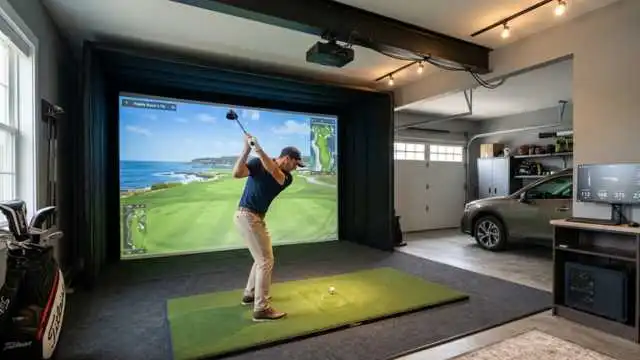
Getting space for the setup is concerned with home users. The SC4 PRO would ideally be set up 5 feet behind the ball (Voice Caddie recommends), and if hitting into a screen or net, also have 10 feet from the ball to that screen or net.
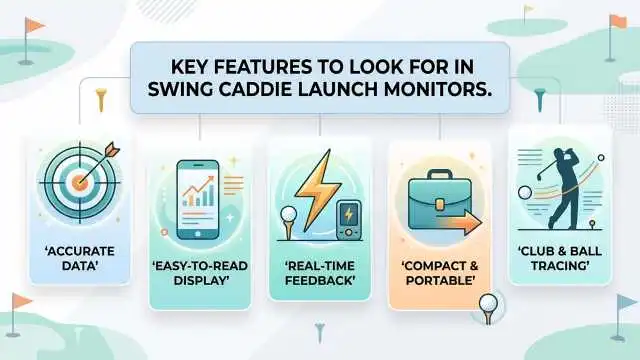
Key Features to Look for in Swing Caddie Launch Monitors
Carry Distance
“Carry distance” refers to the distance a ball travels through the air before hitting the ground. It’s one of the most important numbers for real golf since forced carries over bunkers, water, and hazards rely on carry, not total distance.
Total Distance
Total distance adds a predicted roll after landing. Handy for practicing with drivers and fairway woods, it can be erratic because roll varies with turf firmness, angle of descent, etc.
Swing Speed
Swing speed is an indication of how fast the club is moving at impact. It informs golfers if speed training, strength work, or swing changes are really adding clubhead speed.
Ball Speed
Ball speed is how quickly the ball leaves the clubface. This is among the very best indicators of just how good a strike is. If ball speed increases without an increase in swing speed, then you are probably hitting the ball more solidly.
Smash Factor
Smash factor is the ratio of ball speed to club speed. According to Voice Caddie, this is the measurement of how effectively energy moves from the clubhead to the golf ball.
Launch Angle
Launch angle: This is the degree of upward angle at which the ball leaves after contact. Too low and the ball doesn’t carry (enough distance)—then you fill in the blanks. High enough, and the ball can lose distance because it simply heightens—”Hey, I’m spinning” as it picks up.
Spin Rate, if Available
Golfers can learn aspects of distance control, driver performance, and iron flight from spin rate. SC300i: spin rate (listed via the app); current SC4 PRO: spin rate (displayed in the metrics).
Simulator Compatibility
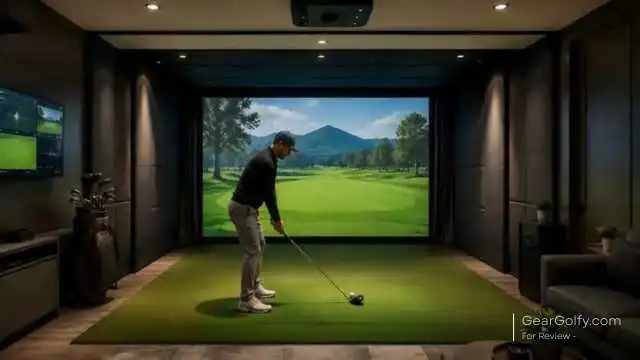
If you plan on using it to play virtually or set up a home sim, you’ll want simulator support. In this aspect, the SC4 PRO is also a more powerful option since it supports simulator play with Voice Caddie S and works with E6 Connect and Optishot Orion.
App Support
The app interface allows one to convert raw numbers into helpful practice history. The MySwingCaddie app is utilized by the SC300i, while the simulator-styled features of the SC4 PRO are operated through the Voice Caddie S app.
Portability
If you enjoy practicing at the range, a portable launch monitor needs to be easy to transport and fast to set up behind the ball. Applications: Portable Practice – SC300i and SC4 Models
Ease of Setup
The Swing Caddie line wins major points for its ease of setup. The SC4 was described as being particularly user-friendly by Golf Monthly too: “Charge, switch on, place it behind the ball, line up, and hit your shots.”
Battery Life
Battery life is important if you practice enough. Voice Caddie rates the SC300i at up to 20 hours of battery life and lists the approximate battery life for the SC4 PRO in its FAQ at 10 hours.
Who Should Buy a Swing Caddie Launch Monitor?
Beginner Golfers
So if you are a beginner, the advice here is to opt for a Swing Caddie launch monitor, as it takes away randomness from practice. Rather than just asking yourself, “Did that feel good? & beginners can get a feel for things like carry distance, ball speed & launch angle. Which makes it simpler to recognize the progress.
Improving Golfers
Swing Caddie launch monitors are great for mid-handicappers and golfers working to improve, as they can map their distances with each club, monitor changes in swing performance, and ensure consistent wear.
An example would be seeing if a more controlled 80% swing provides you with better carry distance control than a full power swing.
Home Simulator Users
Every SC4 is a better headphone. However, home simulator users ought to scrutinize the SC4 family extra carefully than I did. The SC4 PRO doubles as a launch monitor and simulator unit that also features E6 Connect compatibility.
Budget-Conscious Players
Swing Caddie: For the golfer who wants shot data but not at a multiple-thousand-dollar price point. While it is not on par with the premium fitting system, it offers valuable practice feedback for a fraction of the price.
Who Should Not Buy One?
A Swing Caddie launch monitor will not be a good fit for each and every golfer. If you require professional club fitting, fine-grain delivery data, or tour-level precision, then you’re likely after one of the premium systems used in fitting studios and coaching bays.
Such high-end systems typically feature more capable data, improved camera or radar technology, and greater analytical depth.
In addition, if you require an eagle eye in terms of spin axis, face angle, club path, attack angle, or impact location, a Swing Caddie may leave you wanting. It should be considered a golf training aid rather than some kind of Masters-level analysis system.
Lastly, if you have assembled a top-end sim room and simply desire the most authentic full-course experience available, shop Swing Caddie against higher-octane systems prior to purchasing.
Swing Caddie vs Premium Golf Launch Monitors
To best compare Swing Caddie launch monitors with high-dollar/premium golf launch monitor options, it’s easiest to evaluate the job and purpose of each product.
For the most part, Swing Caddie is intended more for beginner-to-intermediate golf-level practice feedback in a travel-friendly product. It provides informative numbers to average golfers in a matter of minutes. You can take it to the range, use it in a garage net setup, or monitor your performance while you practice.
The premium flight monitors reprioritize accuracy, data volume, and comprehensive fitting. These were popular with instructors, club fitters, indoor golf studios, and elite players.
This may include increased club data, improved spin and launch measurements, and greater compatibility with top-end simulator environments.
That does not mean that one category is “good” and the other is “bad.” This means that they sell to different purchasers.
If you are a beginner and just trying to figure out your carry distances, a Swing Caddie launch monitor may be all you need! A premium system may be necessary if you are paying for a professional driver fitting or analyzing minute spin-axis shifts.
The SC4 review on Golf Monthly is in a related spirit, noting that it is a powerful, valuable, portable launch monitor capable of functioning standalone or with the MySwingCaddie app to tap into its full power.
Pros and Cons of Swing Caddie Launch Monitors
Pros
- Lower cost compared to higher-end launch monitors
- Portable enough for range practice
- This is the information that low-, mid-, and even high-handicap golfers will find useful about where they are hitting their shots.
- Built-in display on key models
- Teaches golfers their true carry distances
- Great for monitoring swing speed and ball speed
- The SC4 family supports simulator-style practice.
- No complicated setup is needed; basic use has you up and running.
Cons
- Not necessarily a substitute for professional club fitting systems
- May be limited in comparison to premium monitors for some more advanced data.
- Indoor Setup — You need to have room for the ball to fly properly, but if you can place it correctly
- Simulator capabilities are only as good as the apps, third-party software, and/or subscriptions you have access to.
- Despite this, spin and high-level ball-flight numbers always align with systems at the premium level.
- Data may be an issue (range balls, poor alignment, lighting, mats, and setup errors).
Buying Guide: How to Choose the Right Swing Caddie Launch Monitor
Best for Range Practice:
If range is your number-one priority, the SC300i is the one to go for. It’s simple, portable, and zeroes in on the metrics most golfers use every practice session—carry distance, ball speed, swing speed, launch angle, and smash factor.
Best for Home Golf Simulator Setup:
The SC4 family (as shown in the image above) is for you if you want simulator support. With app compatibility, E6 Connect compatibility, and a design to be used for both a launch monitor and a 3D driving range simulator, the SC4 PRO is out of this world.
Best for Budget Users:
If you don’t need simulator features, normally the SC300i offers better bang for your buck. Which is great for some actual shot data without having to necessarily go all out with the indoor golf equipment.
Best for Data-Focused Players:
There are stronger app-based practice tools and more data with the SC4 family. Launch direction and spin rate are just two which makes the SC4 PRO our pick for golfers looking for more in-depth feedback.
Best for Casual Golfers:
There’s broad appeal for the SC300i to casual golfers wanting to make range sessions a little more pleasurable and productive. This is less scary and doesn’t need a simulator mindset.
FAQs About Swing Caddie Launch Monitors
It is possible, and a Swing Caddie launch monitor might be sufficient when it comes time to practice regularly (especially if your goal is tracking trends in carry distance, swing speed, and ball speed). Voice Caddie rates the SC300i as ±2% ball speed and also lists accuracy of ±3 yards carry distance in target mode and ±3% carry distance in practice mode.
But accuracy hinges on setup, alignment, ball type, indoor space, and hitting conditions. A high-end launch monitor is still a better option for professional fitting.
Yes. Just simplistic numbers that matter to a beginner, which is why Swing Caddie is good. A beginner requires not 25 advanced data points. With that, you can do enough to increase your practice efficiency with precision on carry distance, swing speed, ball speed, launch angle, and smash factor.
A word of caution: Yes, you can use your Swing Caddie model indoors; however, space is key with setup. The Voice Caddie gives recommended positioning behind the ball, and for SC4 PRO net or screen usage, it recommends roughly 10 feet from the ball to the net or screen.
Get the SC300i if all you do is hit the range and want easy, practical information. Get the SC4 family if you need a more traditional simulator practice for indoors.
By contrast, the SC300i represents the more sensible starting point for most beginners and mid-handicap golfers. Home simulator users will find that SC4 / SC4 PRO may be more appropriate.
This SC300I is primarily a portable practice launch monitor. Perfect for range sessions, club distance mapping, and basic shot data.
Newly integrated with simulator support, more advanced display/app features, and wider usage for indoor golf training. To sum it all up, the SC300i will be more beneficial for range-focused golfers, while the SC4 will serve a better purpose for those looking for simulator features.