A Launch Monitor completely transforms the way you practice golf! Real numbers like ball speed, launch angle, spin, carry distance, club path, and face angle replace the guesswork of trying to work out why a shot went left, came out low, or lost yards.
That is even more important if you are keeping score indoors. By hitting into a net or a projector screen, you do not see the entire ball flight. Your feedback system becomes a launch monitor.
The VTrack launch monitor has begun to catch on among golfers who want a little less clutter in their indoor simulator setups and do not want some device parked on the floor right next to the golf ball.
According to public product information, VTrack is a launch monitor featuring dual stereoscopic cameras (with part of its data from the Golf Mechanics system),
It has a wide hitting area, ball and club data, left- and right-handed support, a ceiling-mounted camera system type design that works with E6 Connect and GSPro simulator platforms.
Table of Contents
What Is the VTrack Launch Monitor?
The VTrack launch monitor is an indoor golf launch monitor primarily designed for use in a simulator environment.
While portable floor-based units are sometimes referred to as portable, the VTrack Launch Monitor is listed in the end-user kit as a ceiling-mounted launch monitor, meaning it remains affixed above the hitting area rather than being placed next to or behind the golfer.
This overhead design is especially interesting to:
- Home golf simulator owners.
- Garage simulator setups.
- Basement golf rooms.
- Golf coaches.
- Indoor golf studios.
- Players who want lefty/righty convenience.
- A unit for golfers who do not have the desire to move a unit between each of the shots.
VTrack DX10- All measurement data from VTrack DX10 is dual stereoscopic cameras with ultra-high-speed camera support up to 1,800 fps and 23 ball/club data points with no stickers required for club use in the sim. Laon SwingCraft official page. It comes with ceiling installation requirements more interesting than that!
This puts VTrack in a separate segment altogether from portable launch monitors. And it looks more suited to a permanent indoor simulator bay than a day at the range.
Key Features of the VTrack Launch Monitor
Ball and Club Data Tracking
For the most part, you buy a launch monitor because you’d like to know about ball flight AND swing delivery. According to the public VTrack listings, the system is offering club, ball, and shot/flight data.
According to the VTrack Launch Monitor official page, there are 23 data types in total, including club speed, face angle, attack angle, ball speed, launch angle, spin, carry, and total distance, as well as run.
There are dealer listings that separate the data into measured club, measured ball, and calculated ball flight. That said, golfers should always verify the specific model, as data available depends on its version, setup, and software integration.
Indoor Practice Support
VTrack Launch Monitor is definitely designed for use in an Indoor Golf setting. Key features: indoor simulator, fast shot feedback, a large hitting area, and ceiling mounting. That’s more important than portability for players practicing in a garage, basement, or dedicated golf room.
Well, a launch monitor such as this can be used for working on:
- Carry distance gaps
- Driver launch and spin
- Wedge distance control
- Club path and face control
- Shot direction
- Strike quality
- Indoor simulator rounds
Simulator Compatibility
According to public product info, the VTrack Launch Monitor is compatible with major third-party simulator software providers such as E6 Connect, E6 Apex, and GSPro.
That’s a huge purchasing decision. A simulator build is only part of the pie when it comes to a launch monitor. Additional equipment requirements are a simulator, gaming PC or compatible computer, hitting mat, screen/net to hit into, projector (optional), and room to swing.
Before buying, confirm:
- Which simulators’ software is supported today?
- Whether the connection requires extra setup.
- Which software license(s) are included?
- GSPro or E6 needs to be purchased separately.
- What future software updates could do for the compatibility of your device?
Camera-Based Tracking
It looks like you are always better off with indoor-based camera launch monitors, and the VTrack Launch Monitor will most probably be one of them. An official product page talks of dual stereoscopic cameras and AI vision tech, while Laon People gets into detail about capturing club and ball movement at 1,800 frames per second.
Camera-based systems tend to be an indoor selection because they observe the ball and club angularly through influence. They do not require the same long ball flight window needed by some radar-based units.
Space-Saving Setup
They use an overhead launch monitor to minimize the hardware on the ground. This can be nice to keep the simulator bay cleaner and more comfortable, especially if both right-handed and left-handed golfers share the same space.
However, the specifications on VTrack’s official installations page state a required minimum floor-to-ceiling height of 106 inches to 122 inches; a recommended impact screen-to-hitting zone distance of no less than 118 inches; and a recommended width (across the whole room) is listed at 213 inches in rich with HTR zones.
Those requirements are important. A golfer with a maintenance-free 8-foot basement ceiling may not have the clearance necessary for this system.
Ease of Use
Dealer pages mention an easy setup or calibration of VTrack, but it should be confirmed with the seller and installation literature. Overhead launch monitors also typically require more planning than portable units, even if the system was built to be user-friendly.
You may need to consider:
- Ceiling height
- Mounting position
- Ethernet connection
- PC requirements
- Lighting conditions
- Calibration board use
- Hitting zone location
- Simulator software connection
How Does the VTrack Launch Monitor Work?
There are two main ways that launch monitors will track your shots: camera-based tracking or radar-based tracking (which is actually what most of the higher-end ones use instead).
High-speed camera-based launch monitors work by recording the club and ball around impact. They pay attention to the hitting zone and compute shot data out of that visual information.
This style is pretty common in indoor simulators since the system does not have to track the ball for a long distance after impact.
Radar-based launch monitors track the ball and sometimes the club through motion using radar waves. Radar units tend to excel outside because of their ability to track the ball for a longer distance. That said, indoor radar systems often require good ball travel, tight alignment, and, at times, even dotted balls to facilitate spin capture.
VTrack Launch Monitor is a photometric camera-based overhead system. That means it is built to look down at the ball and club through impact from above the hitting area.
That can be a practical setup for indoor golfers, as the unit remains mounted and does not need to be moved from right-handed players to left-handed hitters.
VTrack Launch Monitor Accuracy
But how accurately does it do what it claims to do? Golfers may want to know if the numbers are even useful, something they can repeat, and close enough for a practice session or simulator play.
Public pages of products for VTrack boast about their accuracy, rapid analysis, and fast camera tracking prowess. The site officially lists up to 1,800 fps in dual stereoscopic camera mode, and for 23 data points. But ideally, Golfal would need to supplement the claim with hands-on testing before establishing any final performance claims.
Looking into these data points closely helps judge VTrack accuracy:
| To check Face, Loft, and alignment | Why It Matters |
| Ball speed | Helps to measure the quality of strike and distance capability |
| Club speed | Important for performance training and efficiency |
| Launch angle | Impact your driver, irons, and wedge flight |
| Spin rate | Important for distance, stopping power, and trajectory |
| Bag distance | Just some help to create real club gapping |
| Distance | Total is useful for simulator play, but it relies on strong assumptions from the software |
| Shot Direction Monkey | to check Face, Loft, and alignment |
| Club position | Helpful for swing direction and shot-shape work |
| Face angle | Summary for the Apexendra Quantification computing machine: Non, Face Angle is one of the most important Club delivery figures. |
| Impact location | Assist in diagnosing heel and toe, high and low strikes |
More than just the launch monitor itself will affect your accuracy. Set up quality matters. The experience can be influenced by other variables such as lighting, calibration, mounting height, hitting mat position, ball type, and whether or not you are using the included software on a more powerful PC.
VTrack Launch Monitor Pros and Cons
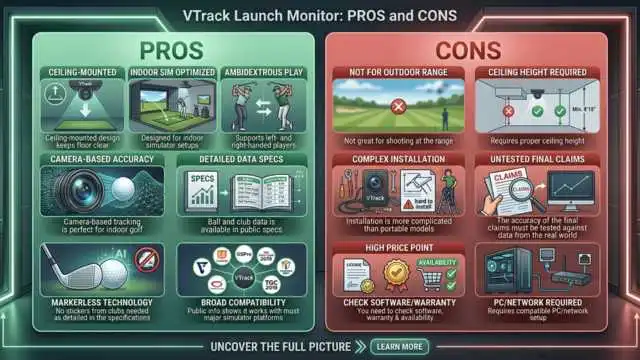
Pros:
- Ceiling-mounted design keeps the floor clear
- Designed for indoor simulator setups
- Supports left- and right-handed players
- Camera-based tracking is perfect for indoor golf
- Ball and club data are available in public specs
- No stickers from clubs needed, as detailed in the specifications
- Public info shows it works with most major simulator platforms
cons:
- Not great for shooting at the range
- Requires proper ceiling height
- Installation is more complicated than portable models
- The accuracy of the final claims must be tested against data from the real world.
- The price could still be high for the everyday weekend player
- You need to check the software, warranty & availability
- Requires a compatible PC/network setup
Who Should Buy the VTrack Launch Monitor?
The VTrack launch monitor will likely be of interest to golfers looking for a more permanent indoor practice and/or simulator. Especially to be considered for:
Home golf simulator users
One interesting note is that VTrack positions its cameras overhead, which then gives you a single hitting area to work with, which may also appeal if you’re building a serious indoor simulator.
Beginners who want better feedback
Beginners can see distance (carry), launch, direction, and strike patterns as much or as little as they want. Having said that, though, those who are new should invest this amount of money only if they are making sure to practice consistently.
Mid-handicap golfers
Ball and club data can potentially provide players who are focused on contact, distance control, driver launch, and shot shape with some real value.
Golf coaches
If testing proves the system to be reliable, a coach working indoors may enjoy lefty/righty support, club data, and impact feedback.
Budget-conscious simulator builders
VTrack Launch Monitor may not be a $50 special, but it also isn’t the top-shelf item, designed to lure buyers who are searching for a premium overhead system at lower costs.
Golfers comparing alternatives
Whether you’re considering Uneekor-style overhead systems, high-end camera-based systems, or indoor-ready radar units, VTrack absolutely deserves a look.
Who Should Not Buy It?
Unfortunately, VTrack Launch Monitor probably isn’t for every golfer. You may want to skip it if:
- This is what you need a portable launch monitor for when you hit the driving range
- Your ceiling is too low
- You want to create a larger virtual physical space for hitting
- All you need is the absolute lowest-end launch monitor available
- You need completely proven accuracy out on tour
- This was found to be a much more useful scenario where heavy formality and professionalism were needed from the customer, where customers would benefit from advanced features for professional fitting.
- You don’t want to flip and find mounting or collimating
- You haven’t built out a full sim rig setup yet
But when your primary driver is basic carry distance in a net, a less expensive portable launch monitor may prove sufficient.
If you wish to have elite fitting, tour-level validation, or commercial studio use, compare VTrack directly against premium systems and test data before purchasing.
Buying Guide: What to Check Before Purchasing VTrack
Before You Purchase the VTrack Launch Monitor: A Checklist, What to Check
- Strict Identification — Verify model no: VTrack DX10 for public pages; verify product version.
- Measured data points — Verify what you measure vs calculate.
- Simulator compatibility — Check support for GSPro, E6 Connect, E6 Apex, or other software.
- Software cost — ask what is included and how many modules/microservices are add-ons.
- Subscription fees —Verify if there are any associated ongoing fees.
- Inside, the official specs dawdle between 106 and 122 inches of floor-to-ceiling height.
- Confirm the hitting zone to impact screen requirement -screen distance.
- PC requirements — Check your PC for Windows, CPU, RAM, storage, and Network requirements.
- Installation Process — Is professional installation recommended?
- Warranty — Check the new warranty with one of our authorized sellers.
- Warranty — Check the most common warranty periods where you intend to use it for work or leisure!
- Reviews — Seek verified purchase evaluations and external tests.
- Support — Confirm how long the US is available for and the response time.
FAQs About the VTrack Launch Monitor
VTrack is a camera-based indoor launch monitor based on dual stereoscopic cameras, with product specifications indicating tracking at up to 1,800 fps. But installation, lighting, calibration, software, and hitting environment change things in the real-world. In exchange for that flexibility, Golfal suggests you check independent testing before using it to permanently fit yourself.
VTrack looks to be made around indoor golf and home simulators. Hanging from your ceiling and offering a large strike area, it’ll work even as a simulator, so it’s geared more towards long-term indoor use than out on the range.
Yes. According to public product information, VTrack has dual stereoscopic cameras and AI vision technology (making it a camera-based launch monitor).
VTrack is sold to home golf simulators and is building commercial indoor golf starting as early as October of this year. Verify your room ceiling height, width, screen distance, PC, and network requirements properly before buying.
VTrack is not a budget-level device (relatively inexpensive compared to some high-end overhead launch monitor systems), but it isn’t one of those low-end entry-level devices either. It needs to be compared with other simulator-specific systems in terms of precision, code support, deployment, and sustainment.